
Oncology Caregiver
Rapid R&D discovery to understand the oncology caregiver space, identify unmet needs and translate them into high-impact, testable concepts. We prioritised four opportunity areas, created four end-to-end concepts and validated them with caregivers. Two concepts progressed into real Pfizer initiatives.

DESIGN LAB COURSE PLATFORM
Project Overview
PROBLEM
Caregivers’ real needs, pain points and daily constraints were not well understood, creating a risk of designing solutions from an internal or clinical perspective.
SOLUTION
4 prioritised opportunity areas
4 end-to-end concepts
4 hypothesis-driven test plans
User validation with caregivers
2 concepts advanced into active initiatives
BENEFIT
Clearer access to information and support
Reduced emotional and coordination burden
More confidence when supporting patients
ROLE
Senior experience lead in the R&D team, owning research, insight synthesis, opportunity definition, concept design and validation strategy.
TIME
6 WEEKS
TASK
Turn caregiver insights into prioritised, validated concepts ready for innovation pipeline entry.
TOOLS
Figma, Miro, UserZoom, Lovable, ChatGPT, Grok, Runway
My Process

Planning
Product Roadmap
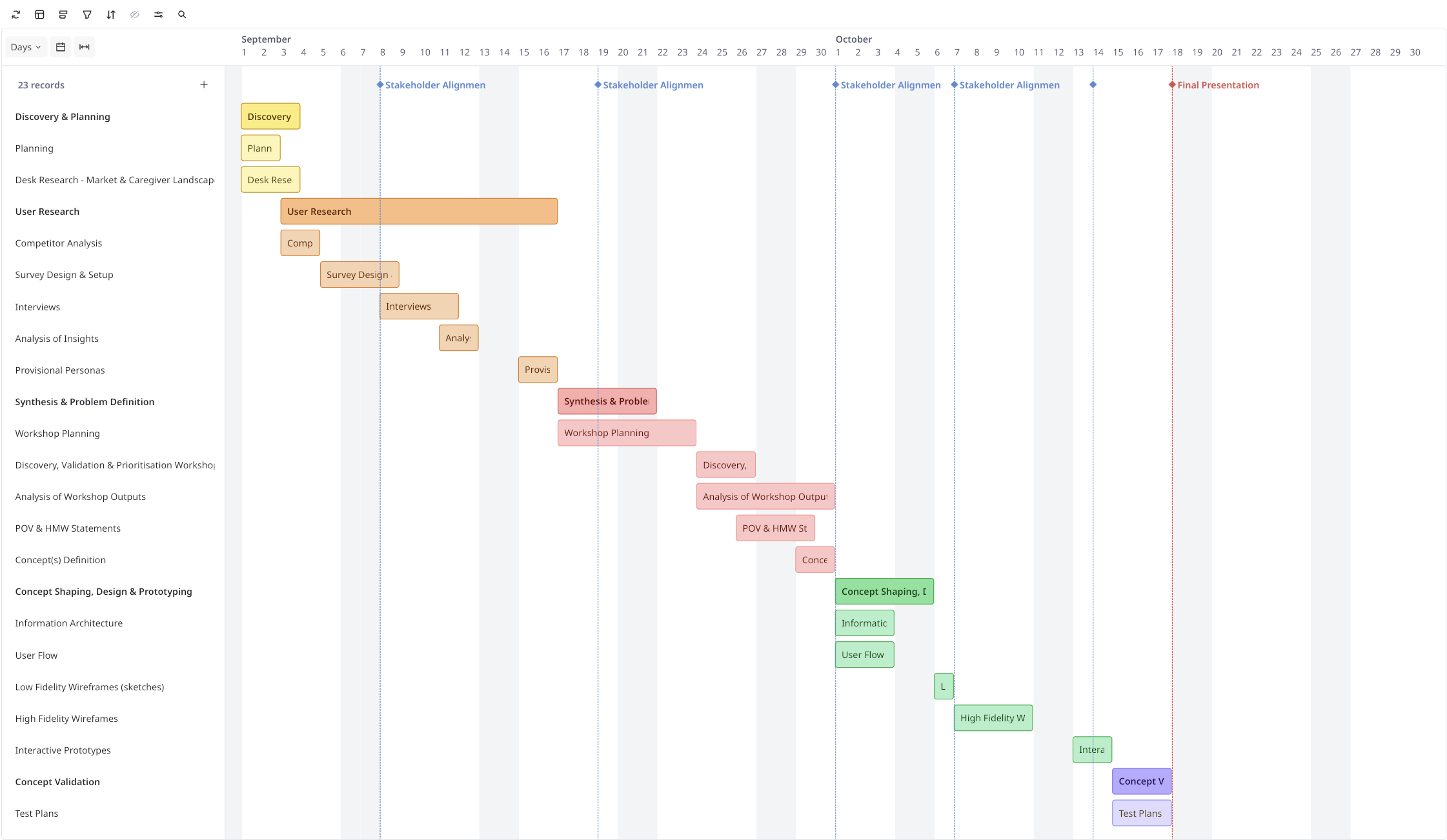
Based on the prioritised caregiver use cases and the aligned user and business goals, I created a focused product roadmap to sequence concept design, validation and delivery activities.
The roadmap aligned research, prototyping and testing milestones, and provided a shared timeline for the R&D and business teams at Pfizer to progress the four concepts from strategy to validated initiatives.
EMPATHIZE
Research
Through desk research (market research and competitor analysis), user surveys, in-depth interviews and empathy mapping, I built a deep understanding of the oncology caregiver space and translated insights into three provisional caregiver personas to guide opportunity identification and concept design for the R&D team at Pfizer.
Research Goals
In preparation to dive into my research, I first set some clear goals and created a research plan that would guide my research process.
Understand the oncology caregiver landscape and emerging trends in caregiver support solutions
Identify and define the key caregiver segments and their core characteristics
Analyse existing caregiver-focused products and services and evaluate their strengths and gaps
Understand how caregivers currently find information, support and tools during the care journey
Understand caregivers’ real end-to-end experiences across critical moments of care
Discover the main pain points, unmet needs and opportunity areas to inform concept creation and prioritisation
Market Research
I started with market research to understand the oncology caregiver landscape, user needs, and healthcare innovation trends, in order to build a holistic view of the caregiver market and the broader healthcare ecosystem in which Pfizer operates.
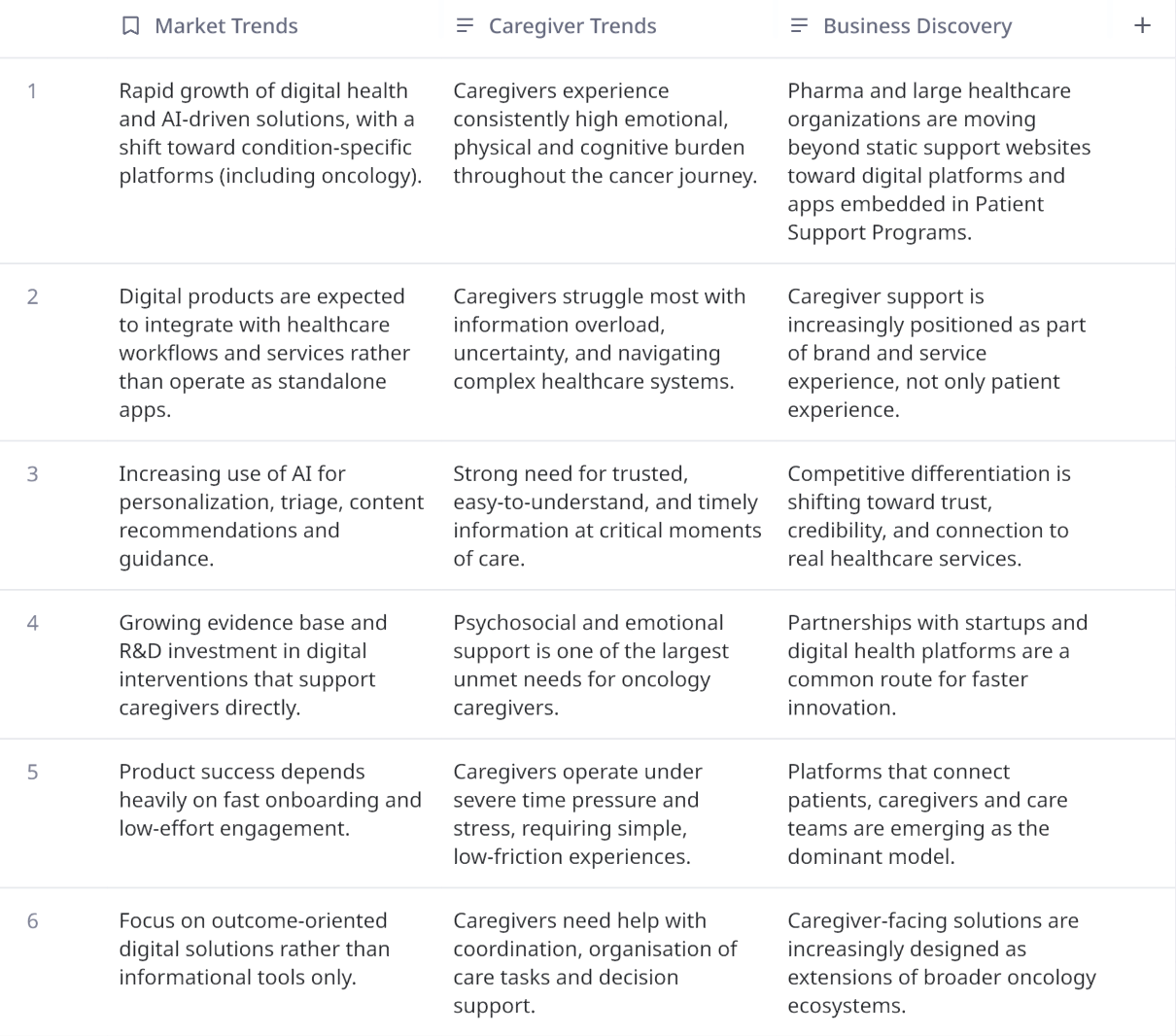
See full table in Miro here
Competitive Analysis
Following my market research, I started to research Design Lab’s competitors so I could evaluate their Strengths and Weaknesses. The insights gained here provided key information in terms of the strengths we want to build upon and the weaknesses we want to avoid while keeping Design Lab’s specific goals in mind.
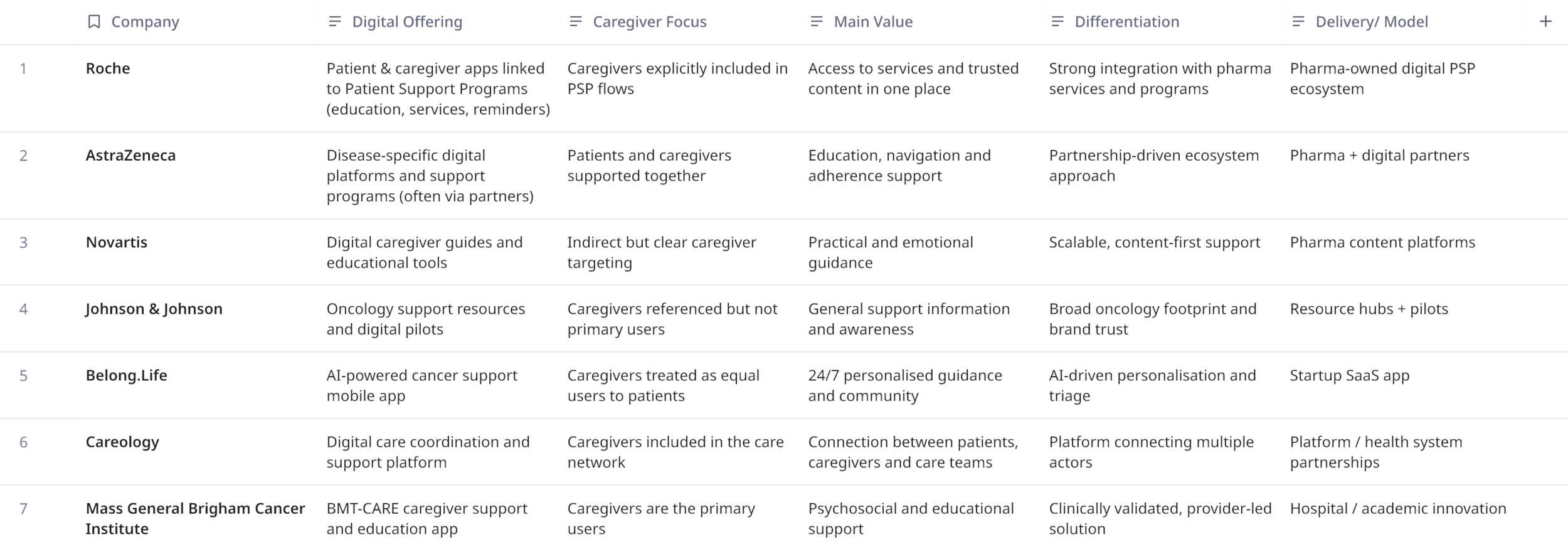
See full table in Miro here
Provisional Personas
Using the insights gained from secondary research, I created provisional personas to quickly identify Design Lab’s potential users. These provisional personas helped set the criteria for my interview participants and would be validated through user interviews.
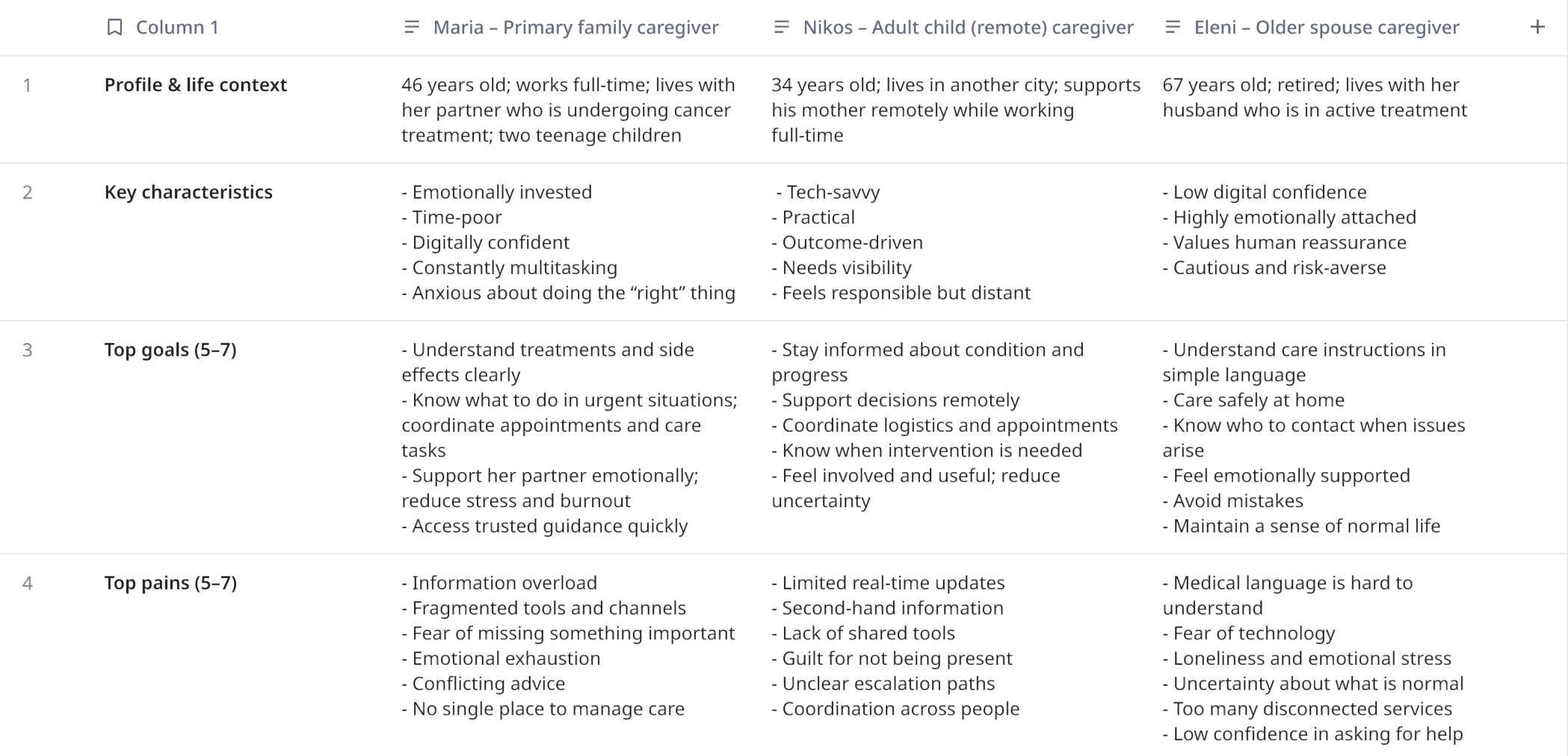
See full details of provisional personas in Miro here.
Interviews
To validate the provisional oncology caregiver personas and deepen our understanding of real caregiver needs, I conducted qualitative user interviews with caregivers supporting patients through different stages of the oncology journey at Pfizer.
During the interviews, I used open-ended questions to explore caregivers’ daily experiences, emotional challenges, information needs and how they currently navigate support, tools and healthcare services. The goal was to move beyond assumptions and capture caregivers’ lived realities in their own words.
I conducted interviews with 5 caregivers, each lasting 15–20 minutes.
Examples of questions asked during the interviews:
Can you walk me through a typical day caring for your loved one?
What are the most difficult moments for you during the care journey?
How do you usually look for information or support when something changes?
Tell me about the last time you felt unsure about what to do.
What tools, apps or services do you currently use to manage care?
What has helped you the most so far as a caregiver?
If you could change one thing about the support you receive today, what would it be?
After completing the interviews, I synthesised the findings and combined them with the desk research and survey data to create the empathy map and validate the three provisional caregiver personas, forming the foundation for opportunity identification and concept design.
Empathy Map
Using an empathy map, I synthesised all the information I gathered during the user interviews to uncover key insights that led to identifying Design Lab’s target user group.
First, I started by categorizing my notes into the categories of Says, Thinks, Feels, Does, Pains & Needs to get an overall understanding of everything learned during my interviews with the different participants.
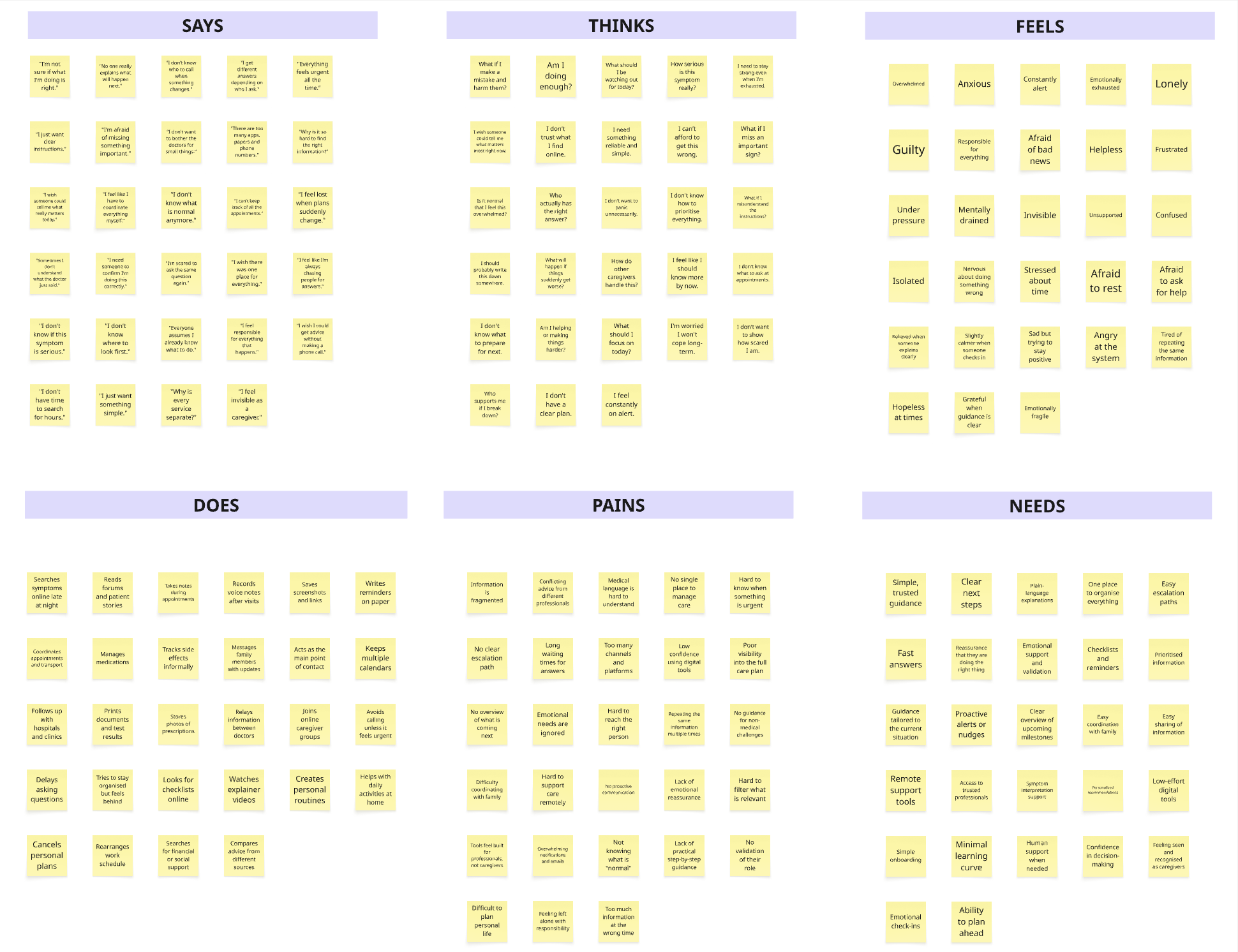
See full empathy map in Miro Here
After completing the empathy mapping, I led a structured theming exercise to cluster all caregiver observations, quotes and behaviours into clear insight groups. By affinity-mapping the post-its across emotional, cognitive and behavioural dimensions, we identified recurring patterns and validated them across different caregiver profiles.
This synthesis allowed us to move from raw qualitative data to a shared, evidence-based understanding of the caregiver experience, resulting in a set of core experience themes that highlighted the most critical unmet needs and systemic gaps. These themes became the foundation for defining opportunity areas, shaping problem statements and prioritising the concepts that were later taken forward for end-to-end design and user validation.
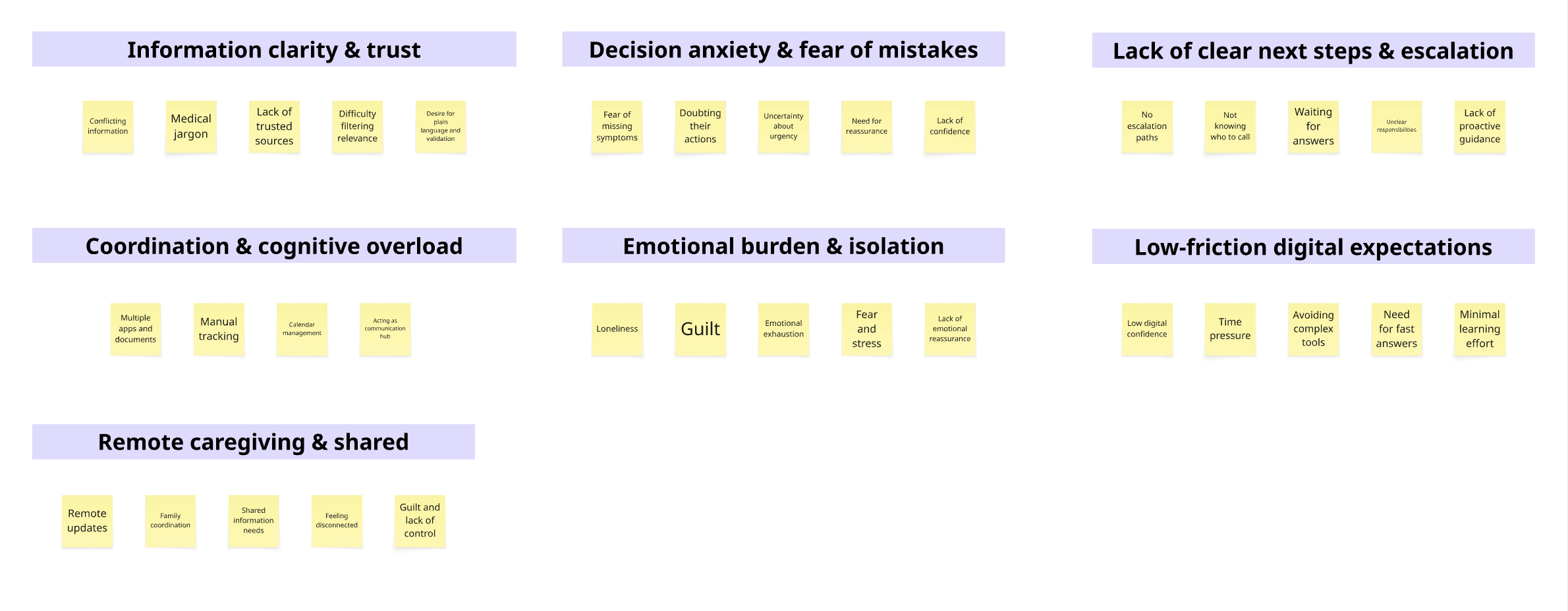
See full theming exercise in Miro here.
Insights
Caregivers are overwhelmed by fragmented and often conflicting information across multiple sources.
Caregivers live with constant decision anxiety and fear of making mistakes that could negatively affect the patient.
Caregivers take on a hidden coordination role, acting as the central hub between healthcare providers, family members and services.
Emotional strain and isolation are a core part of the caregiver experience and are not sufficiently addressed by existing solutions.
Remote caregivers have significantly less visibility into daily care and feel disconnected from both care teams and decisions.
Time pressure and stress make it difficult for caregivers to adopt or use complex digital tools.
Needs
Clear, trustworthy and consistent information delivered in plain language.
Simple, actionable next steps and clear escalation paths for different situations.
Tools that reduce coordination and organisational burden in daily care.
Emotional reassurance, validation and ongoing support.
Easy, fast and low-effort digital experiences.
Better visibility and shared access to information for remote caregivers.
DEFINE & IDEATE
Defining the Problems
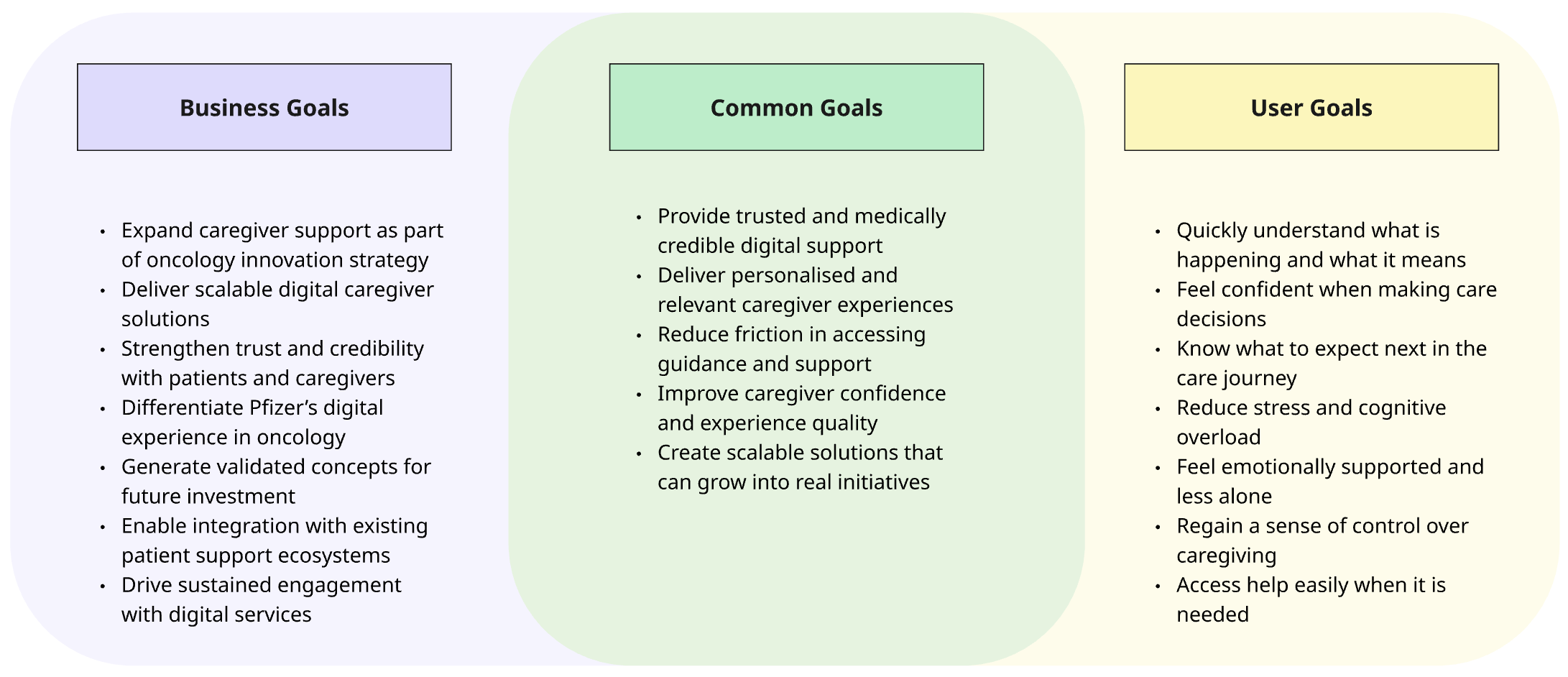
After synthesising the research insights and caregiver needs, I created Point-of-View (POV) statements to clearly define the problems from the caregiver’s perspective. These POVs were then translated into How Might We questions, which framed the most meaningful challenges and guided the team’s ideation and concept development.
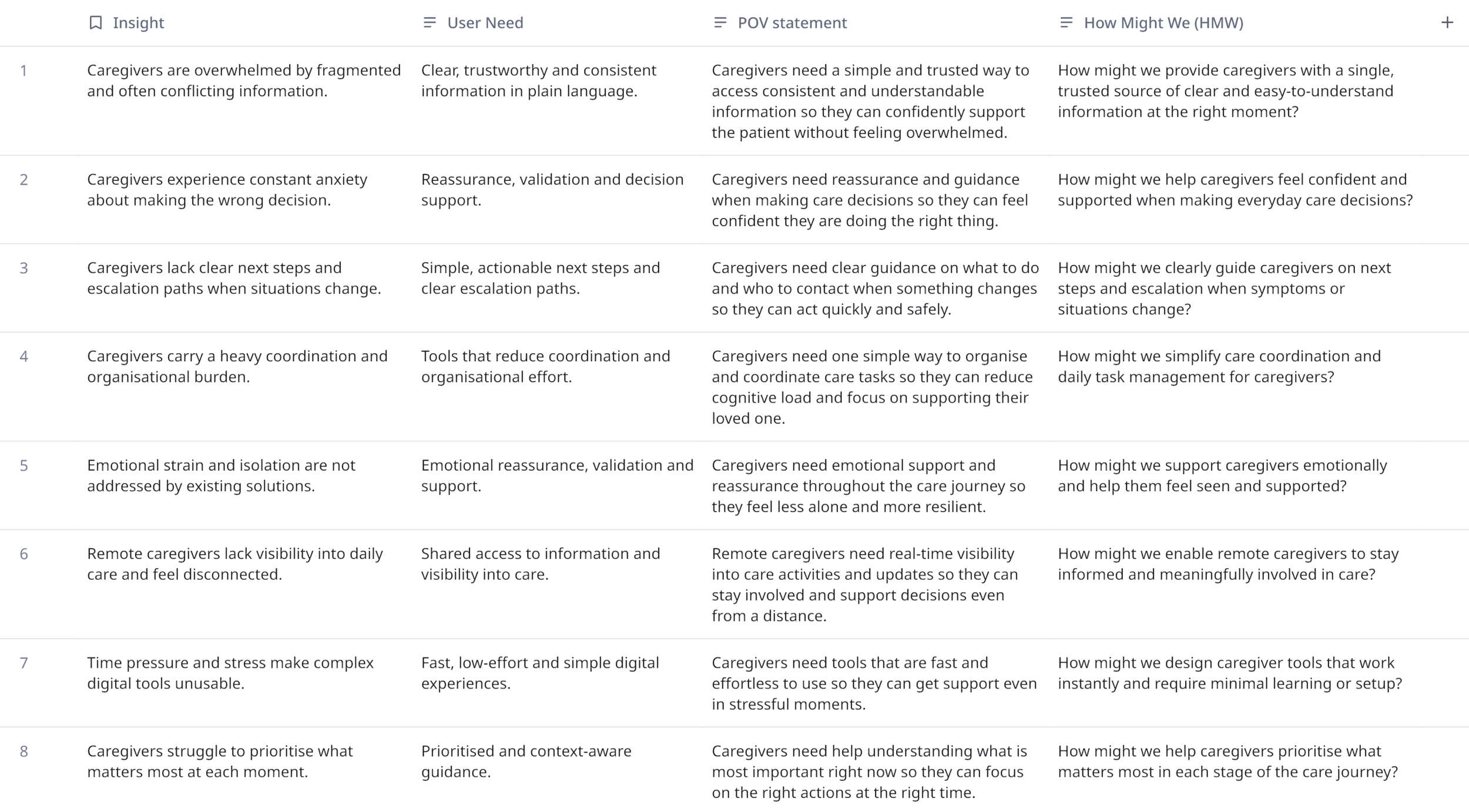
See full exercise here.
Strategising
After the ideation phase, I facilitated a strategy and prioritisation workshop with the R&D and business stakeholders at Pfizer to evaluate all generated ideas against validated caregiver needs and business feasibility and strategic relevance.
The purpose of this phase was to move from a broad solution space to a focused and investable concept set by balancing user impact, innovation potential and organisational priorities.
Through structured discussion and voting, we prioritised the following four use cases as the most valuable and realistic to progress:
Caregiver Transformational Portal – a central, trusted caregiver resource hub for education, guidance and support.
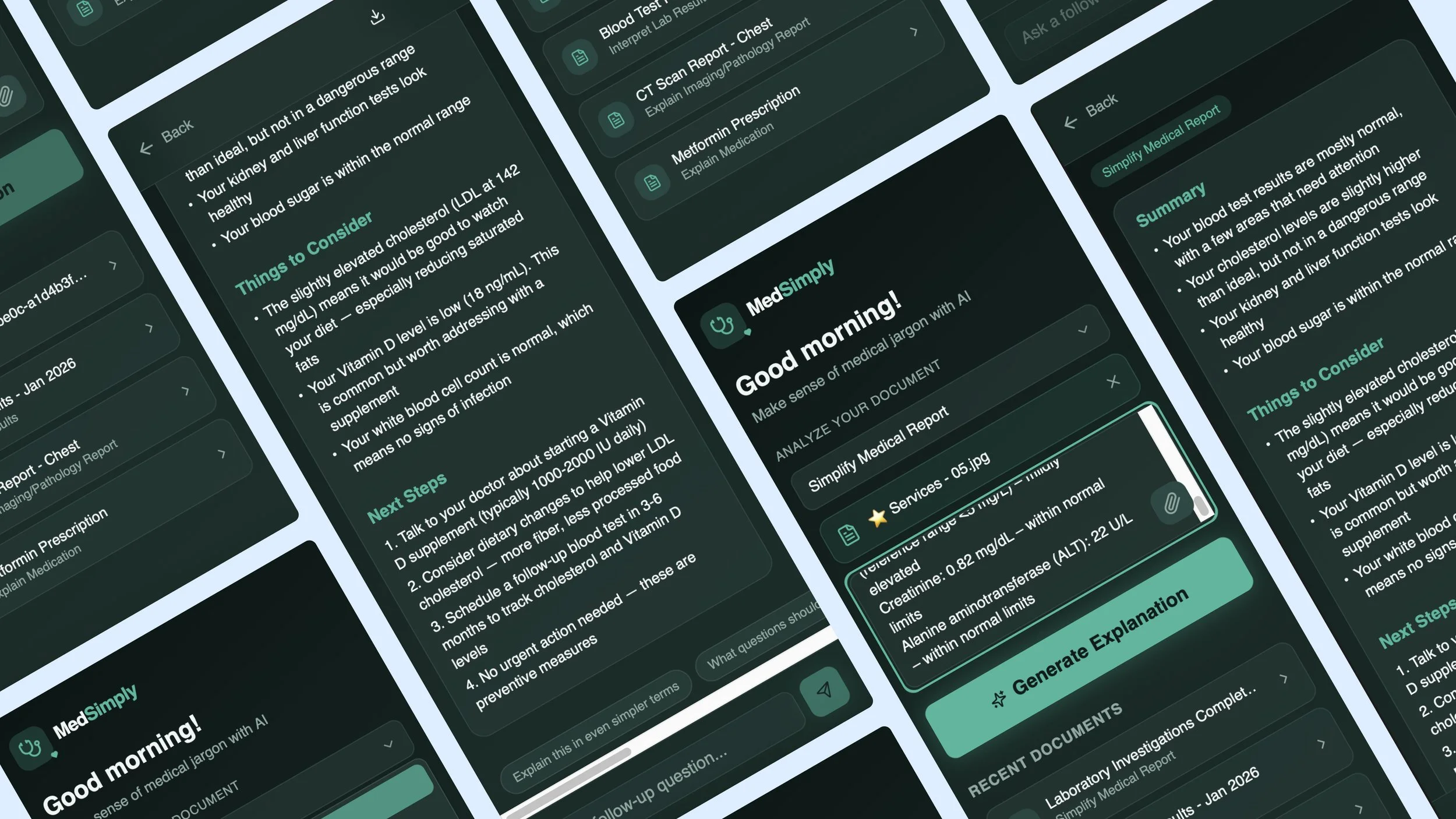
Medical Sense-Maker – a tool that translates uploaded medical exams and documents into clear, human-readable explanations to restore understanding and control.
Random Acts of Kindness platform – a community-driven solution enabling people to offer practical help and support to caregivers.
What to Expect Generator – a personalised guidance experience that walks caregivers through the care journey based on the patient’s medical profile.
These concepts were selected because they directly addressed the highest-priority user needs identified in research, while also aligning with business objectives, innovation strategy and delivery feasibility.
See full exercise here.
Brainstorming
Now that I knew what problems we needed to solve for Megan, I started my brainstorming process to come up with solutions to those problems. I used the HMW questions that I identified and used those to help me brainstorm different ideas through mind mapping.
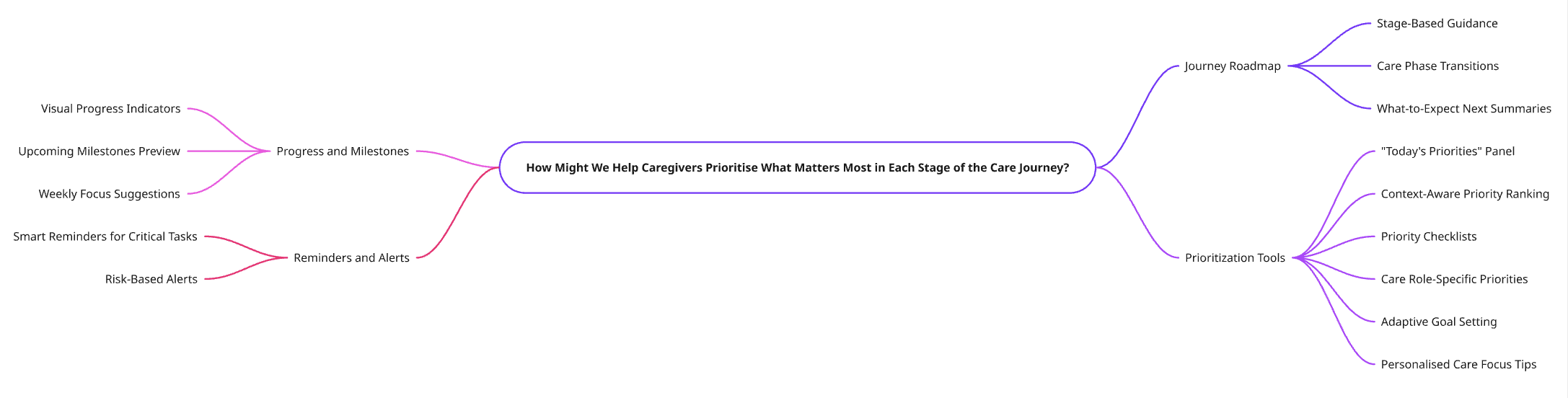
See full brainstorming activity here.
DESIGN & PROTOTYPE
Concept 1: Caregiver Transformational Portal
Concept Overview
Description
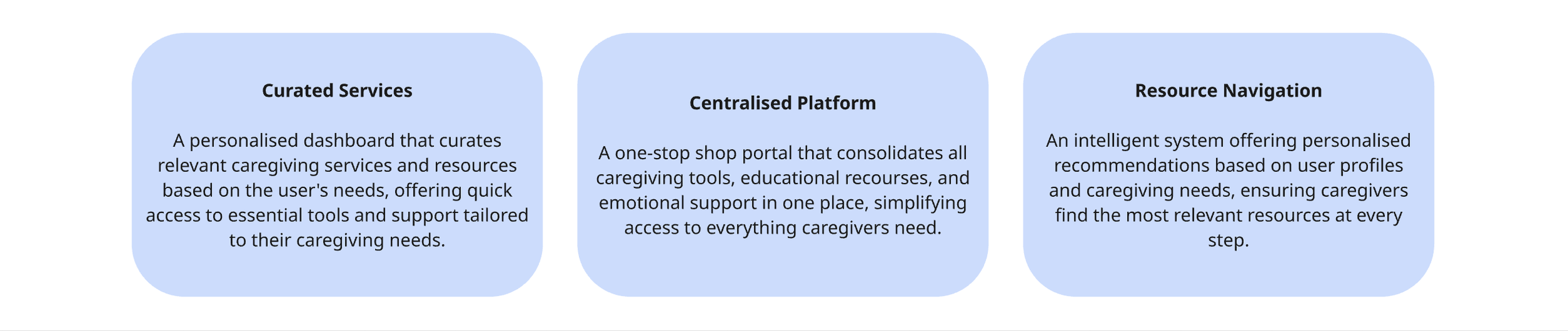
Carer Transformation is a portal that offers a curated selection of services specifically designed for caregivers. It serves as a starting point for caregivers, providing a centralised platform where they can access various recourses and services. The portal acts as a navigator, offering personalized recommendations to guide caregivers in finding the most relevant resources and services for their needs.
Problem Statement
Caregivers face anxiety, stress, and feel overwhelmed due to the complexity of caregiving tasks and lack of certralized support.
Solution
A portal offering personalised services and recourses tailored to caregivers, guiding them through their journey.
Needs
Centralised caregiving resources
All caregiving recourses in one place for easy accessPersonalised Support Recommendations
Tailored guidance to match caregiver’s unique needs.Easy Service Navigation
Effortless navigation to find relevant services quickly
Pains
Overwhelmed from Disjoined Information
Eliminates the stress of searching through scattered recoursesDifficulty accessing tailored Resources
Solves the challenge of finding relevant support for each situation.Lack of caregiving guidance
Provides clear direction on caregiving responsibilities and tasks.
Key Features
The key features section captures the main functional building blocks that support the caregiver journey in the portal, highlighting how personalised recommendations, centralised resources and guided navigation work together to enable caregivers to easily find relevant support and take action with minimal effort.
User Flow
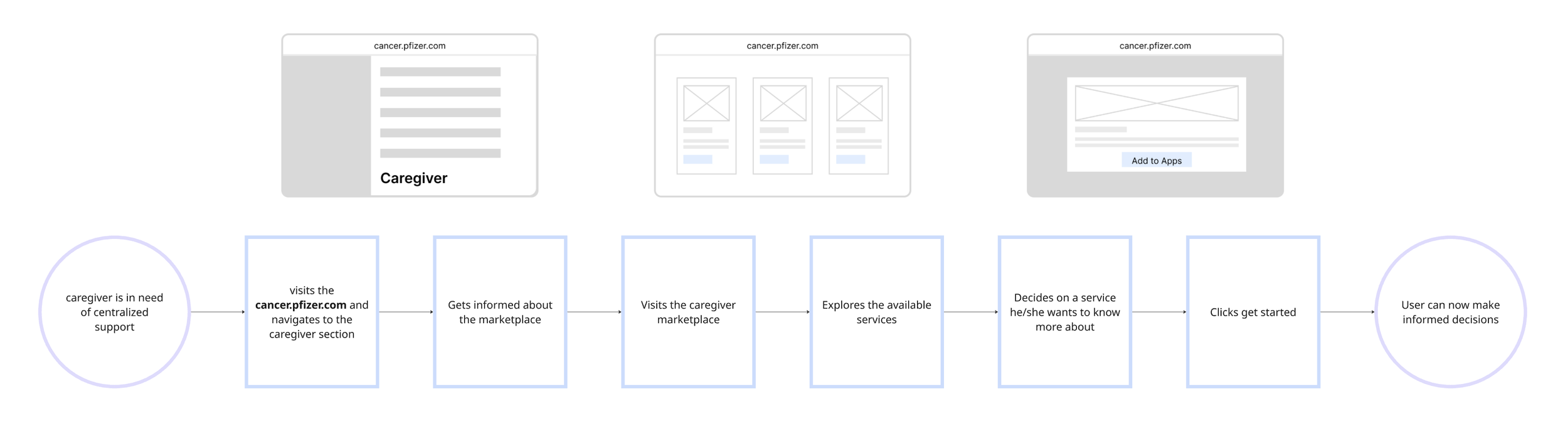
This user flow illustrates how a caregiver enters the portal, provides a small amount of context about their situation, and is guided through a personalised navigation experience that recommends the most relevant resources and services, leading them from initial entry to clear next actions and ongoing, tailored support.
See full exercise here.
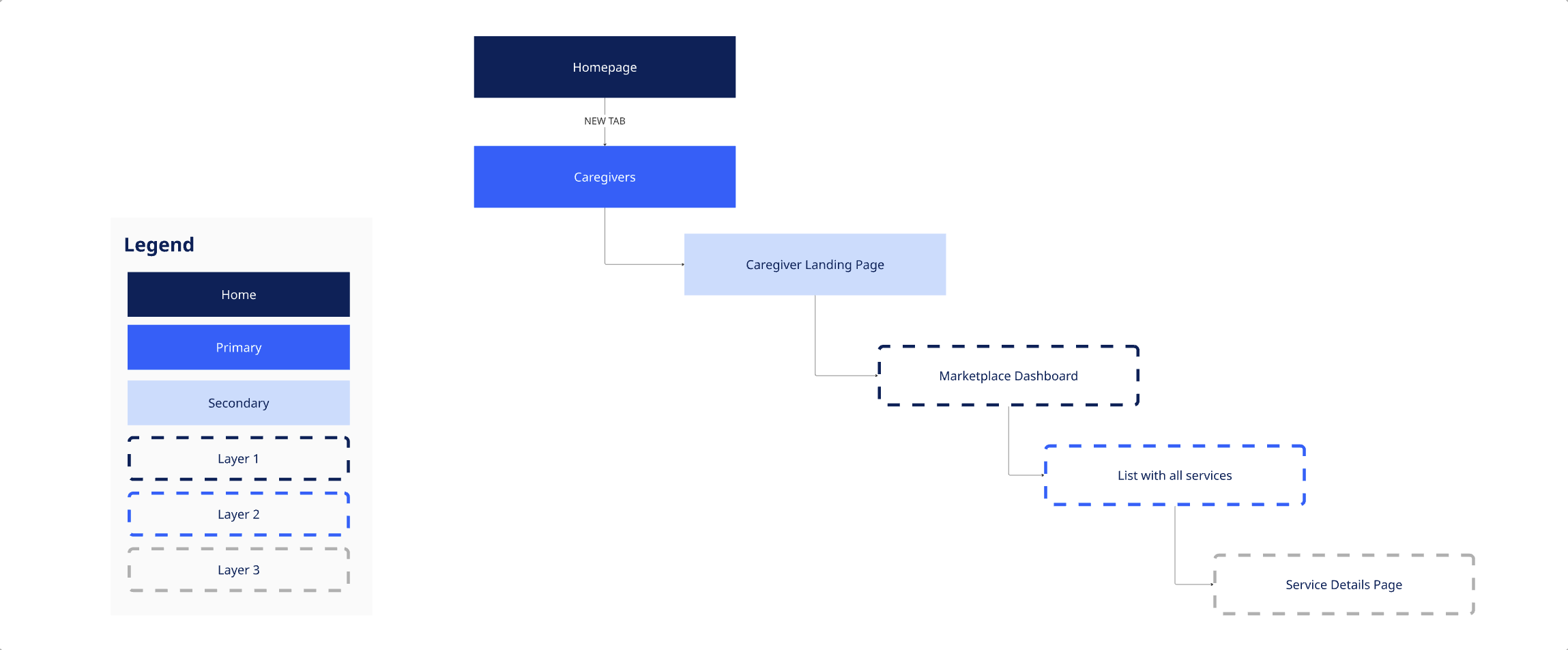
Information Architecture (IA)
The information architecture defines how caregiver content, services and tools are structured and organised within the portal, ensuring that information is grouped logically and surfaced through a simple, need-driven navigation so caregivers can quickly locate relevant support without cognitive overload.
High Fidelity Wireframes & Interactive Prototype
The high-fidelity wireframes and interactive prototype focus only on the essential screens needed to validate the core hypotheses of the Caregiver Transformational Portal, enabling realistic user testing of the personalised entry, guided navigation and resource discovery experience without building unnecessary functionality.
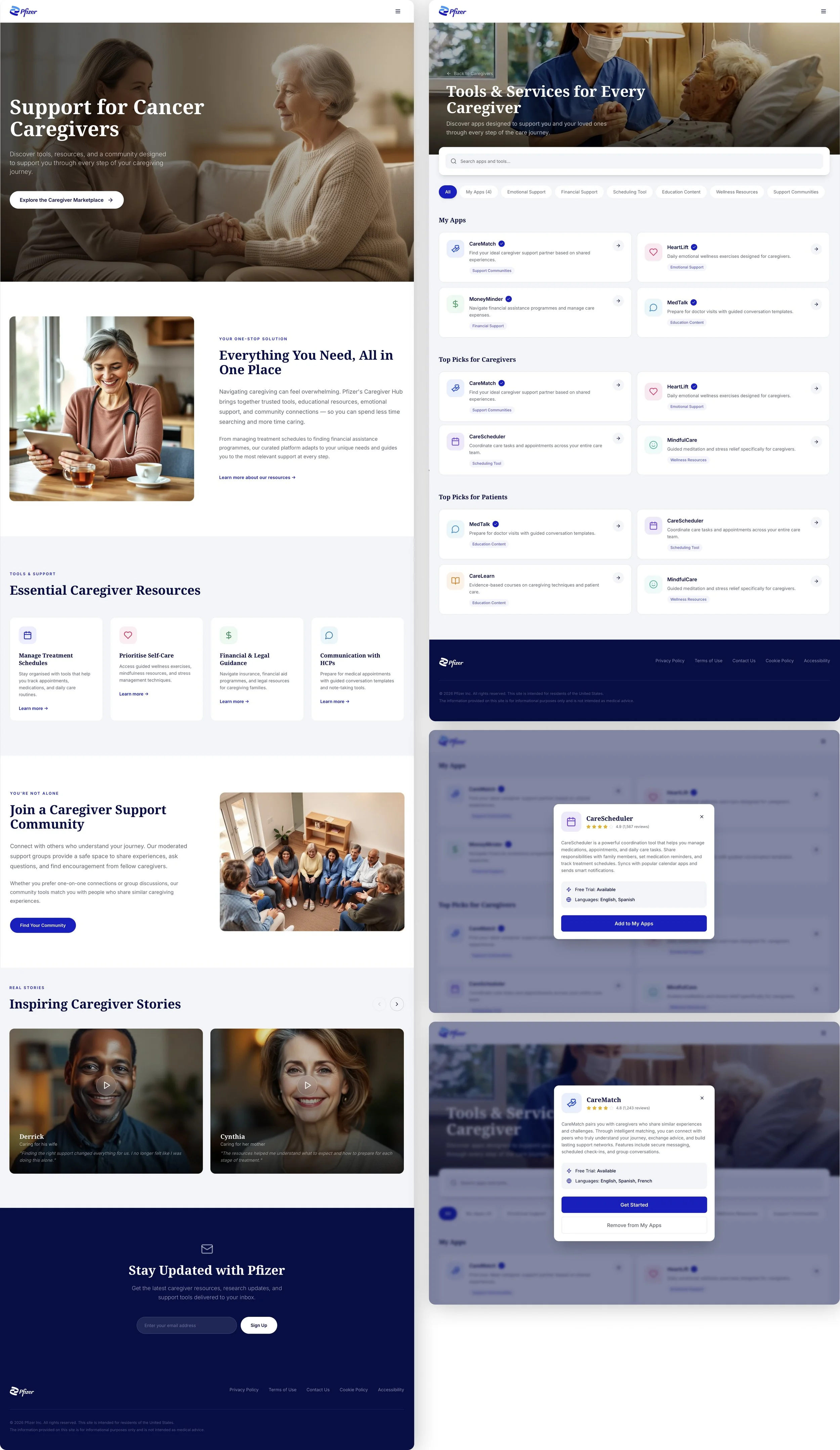
See full interactive prototype here
DESIGN & PROTOTYPE
Concept 2: Medical Sense Maker
Concept Overview
Description
The app utilizes AI algorithms to analyze and simplify medical jargon commonly found in reports, diagnosis, and treatment plans. Medical sense maker helps caregivers interpret medical data, such as lab results, vital signs or imaging reports. It also offers translation capabilities allowing caregivers to translate medical information from one language to another. The app can summarize lengthy medical documents, such as discharge summaries or research articles, into concise and digestible formats.
Problem Statement
Medical Jargon and complex reports create confusion for caregivers, leading to anxiety and misinterpretation of critical data.
Solution
An app that uses AI to simplify medical information, interpret lab results and translate data into understandable language.
Needs
Simplification of Complex Medical Jargon
Clarifies complicated medical language for easier understanding.Assistance in Interpreting Medical Data & Reports
Provides clear interpretation of lab results and medical reports.Easy Translation of Medical Terms
Quickly translates medical terms into multiple languages for better comprehension.
Pains
Confusion with complicated medical language
Eliminates the confusion caused by medical jargon.Difficulty understanding lab results or diagnoses
Solves the challenge of making sense of test results and diagnoses.Language Barriers in Healthcare communication
Overcomes language barriers by providing instant medical translations.
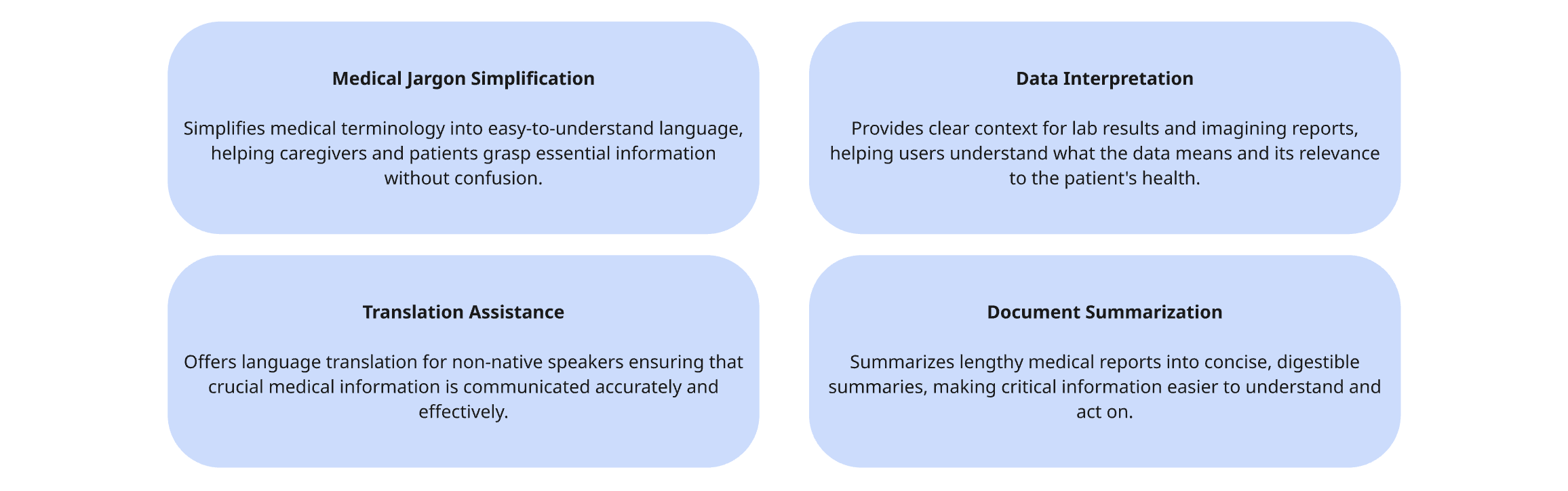
Key Features
The key features focus on AI-powered document upload, medical jargon simplification, lab and report interpretation, multilingual translation and concise summaries that help caregivers quickly understand critical information.
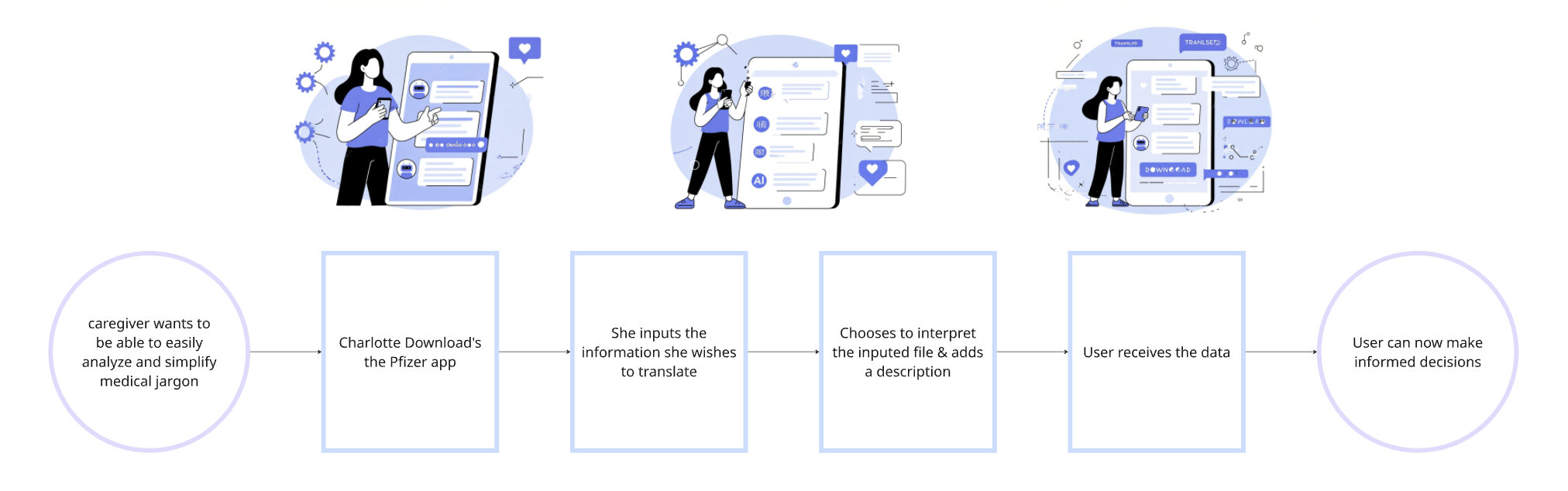
User Flow
This user flow shows how a caregiver uploads or captures a medical document, selects what they want help with (summary, explanation or translation), and receives a clear, plain-language interpretation with highlighted next steps.
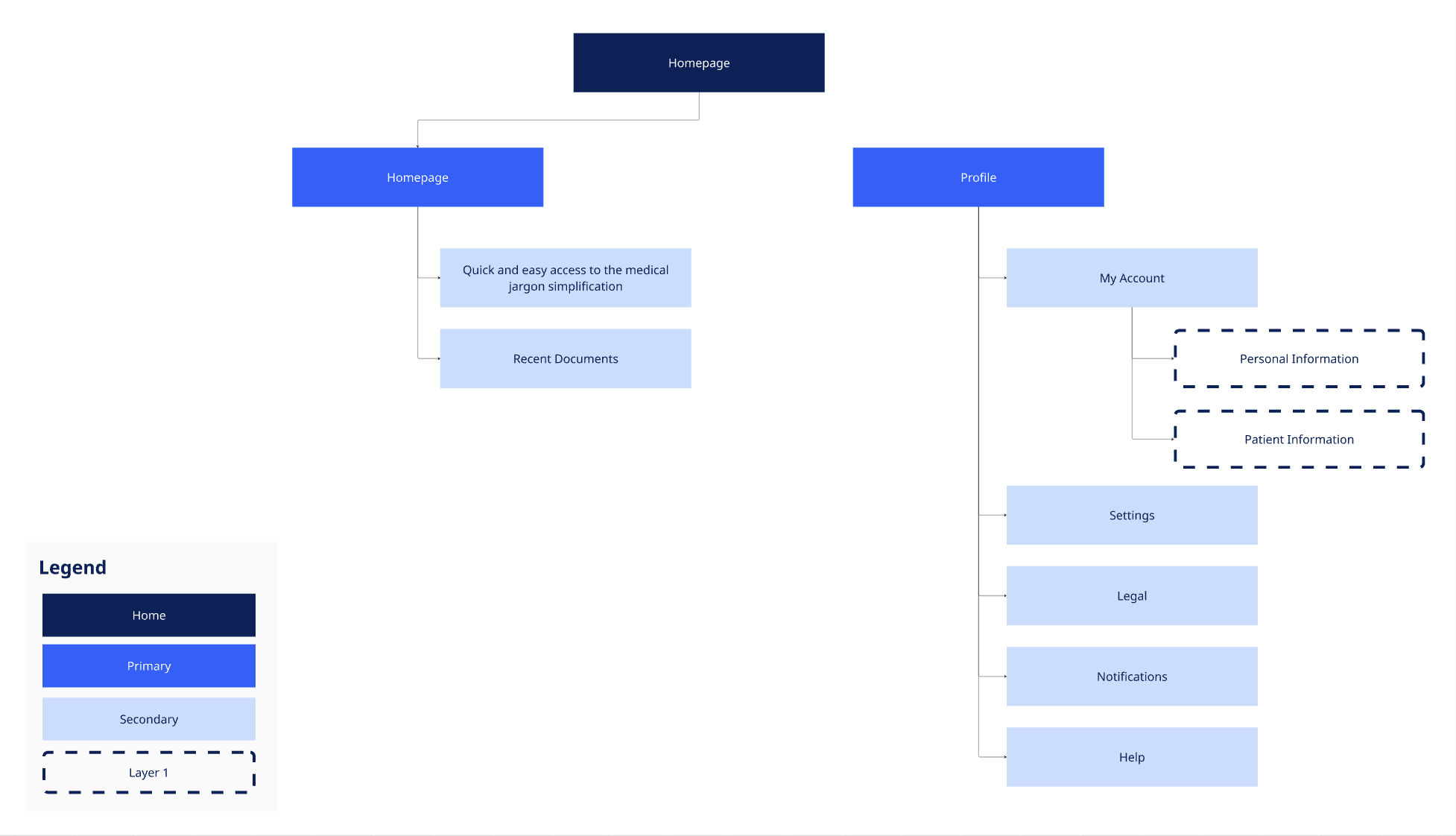
Information Architecture (IA)
The information architecture organises uploaded documents, explanations, summaries and translations into a simple, task-driven structure so caregivers can easily find, revisit and compare interpreted medical information.
High Fidelity Wireframes & Interactive Prototype
The high-fidelity wireframes and interactive prototype include only the essential screens required to validate the core hypothesis of the solution: that caregivers can successfully upload medical documents and understand AI-generated explanations, summaries and translations with confidence.
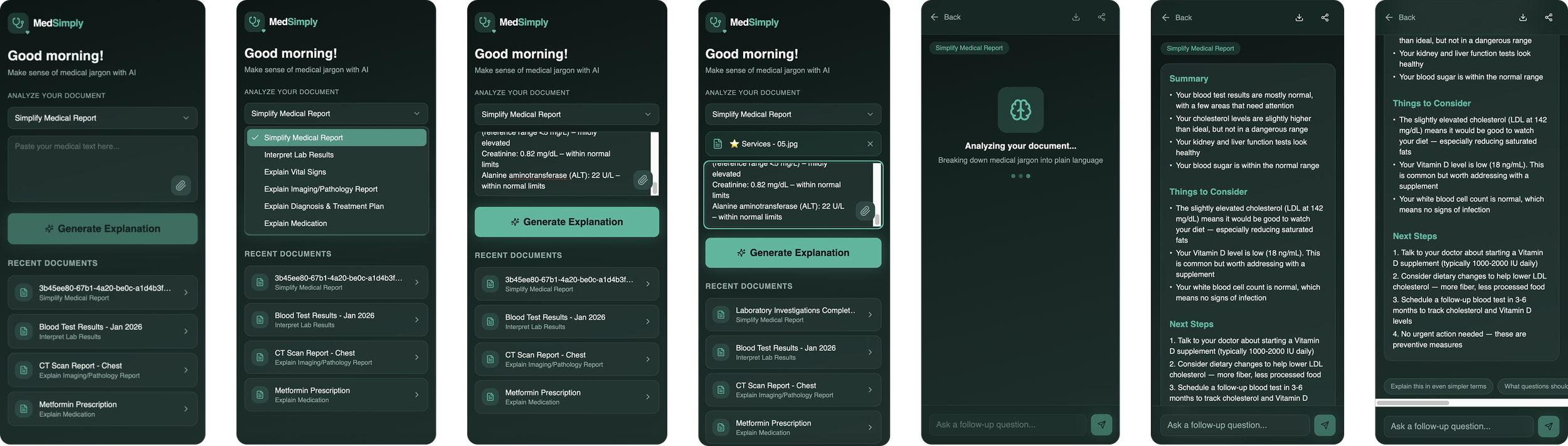
See full interactive prototype here.
DESIGN & PROTOTYPE
Concept 3: Random Acts of Kindness
Concept Overview
Description
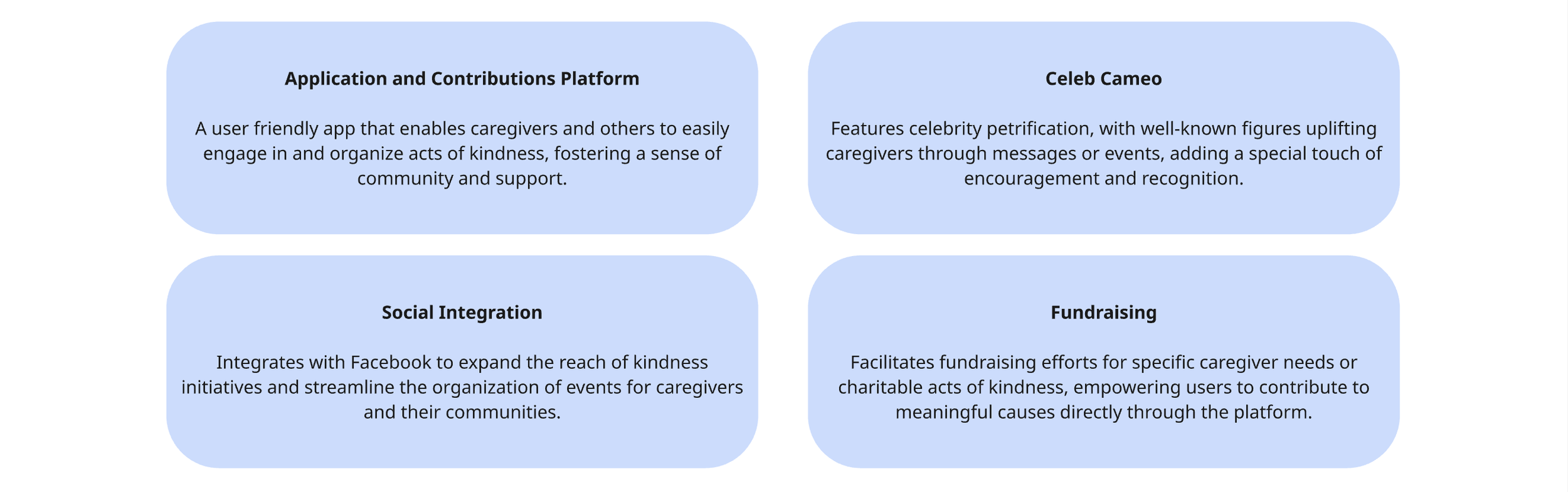
The platform includes a user-friendly mobile application that allows individuals to participate in and contribute to acts of kindness. The platform offers unique feature called “Celeb Cameo” where celebrities or well-known personalities can participate and support acts of kindness. The platform also ingrates with Facebook to leverage its vast user base and social networking capabilities. It introduces the concept of “Who would you like to help” where users can create kindness initiatives and invite others to contribute their time, resources or skills. It provides opportunities for individuals and organisations to raise funds for specific acts of kindness or charitable causes.
Problem Statement
Caregivers often feel isolated and unsupported and experience burnout due to the emotional toll of caregiver.
Solution
A platform fostering a community of kindness, where individuals and celebrities can support caregivers through acts of kindness
Needs
Platform for Organising and Contributing to AoK
Provides a space o easily organize and contribute to meaningful acts.Opportunity to involve celebrities and social media
Leverages celebrities support and social platforms to boost campaigns.Easy Collaboration for Fundraising and Volunteer Efforts
Facilitates simple collaboration for raising funds and gathering volunteers.
Pains
Lack of Community Support for caregivers and patients
Addresses the gap in community support for caregivers and patients.Difficulty understanding lab results or diagnoses
Streamlines organising assistance for targeted caregivers needs.Financial Stress in the caregiving journey
Helps alleviate financial burdens through community-driven fundraising.
Key Features
The key features focus on AI-powered document upload, medical jargon simplification, lab and report interpretation, multilingual translation and concise summaries that help caregivers quickly understand critical information.
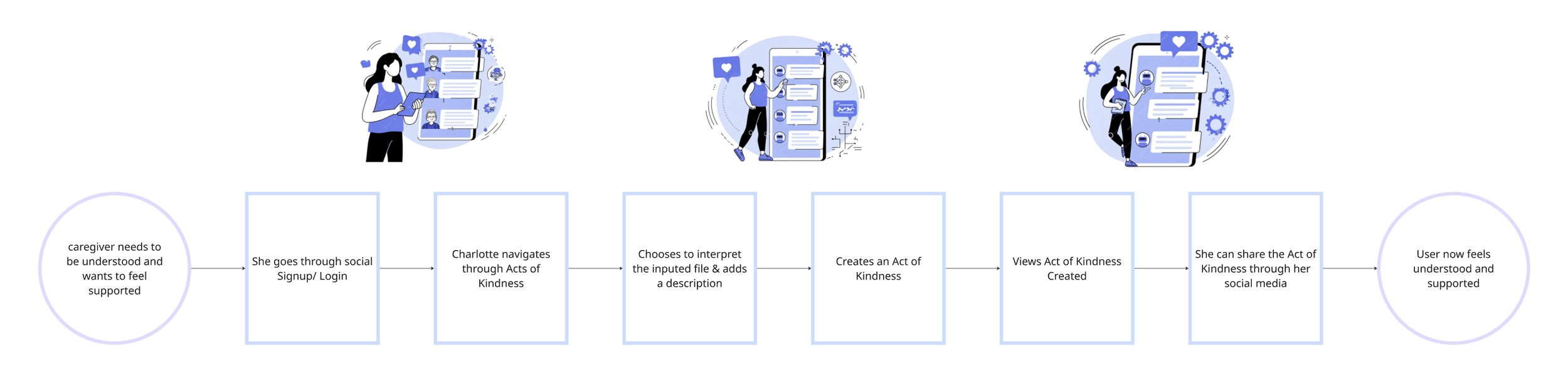
User Flow
This user flow shows how a caregiver uploads or captures a medical document, selects what they want help with (summary, explanation or translation), and receives a clear, plain-language interpretation with highlighted next steps.
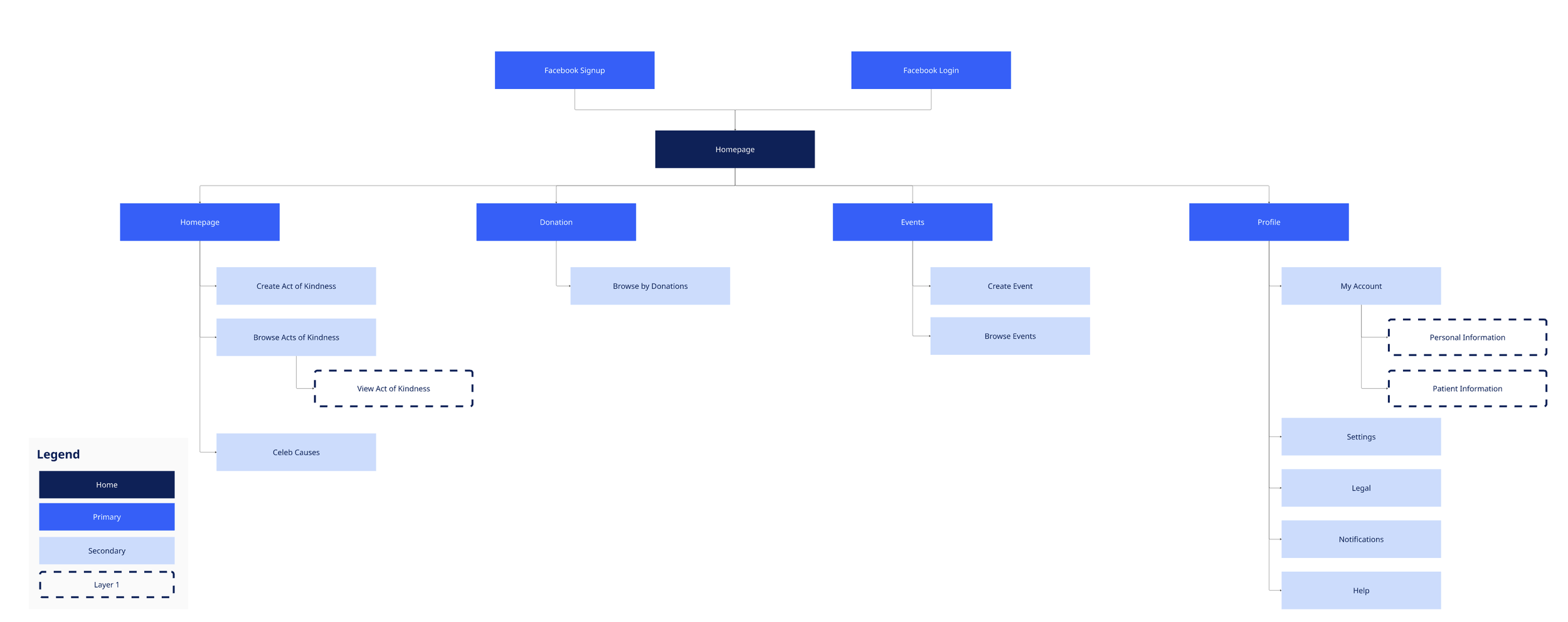
Information Architecture (IA)
The information architecture organises uploaded documents, explanations, summaries and translations into a simple, task-driven structure so caregivers can easily find, revisit and compare interpreted medical information.
High Fidelity Wireframes & Interactive Prototype
The high-fidelity wireframes and interactive prototype include only the essential screens required to validate the core hypothesis of the solution: that caregivers can successfully upload medical documents and understand AI-generated explanations, summaries and translations with confidence.
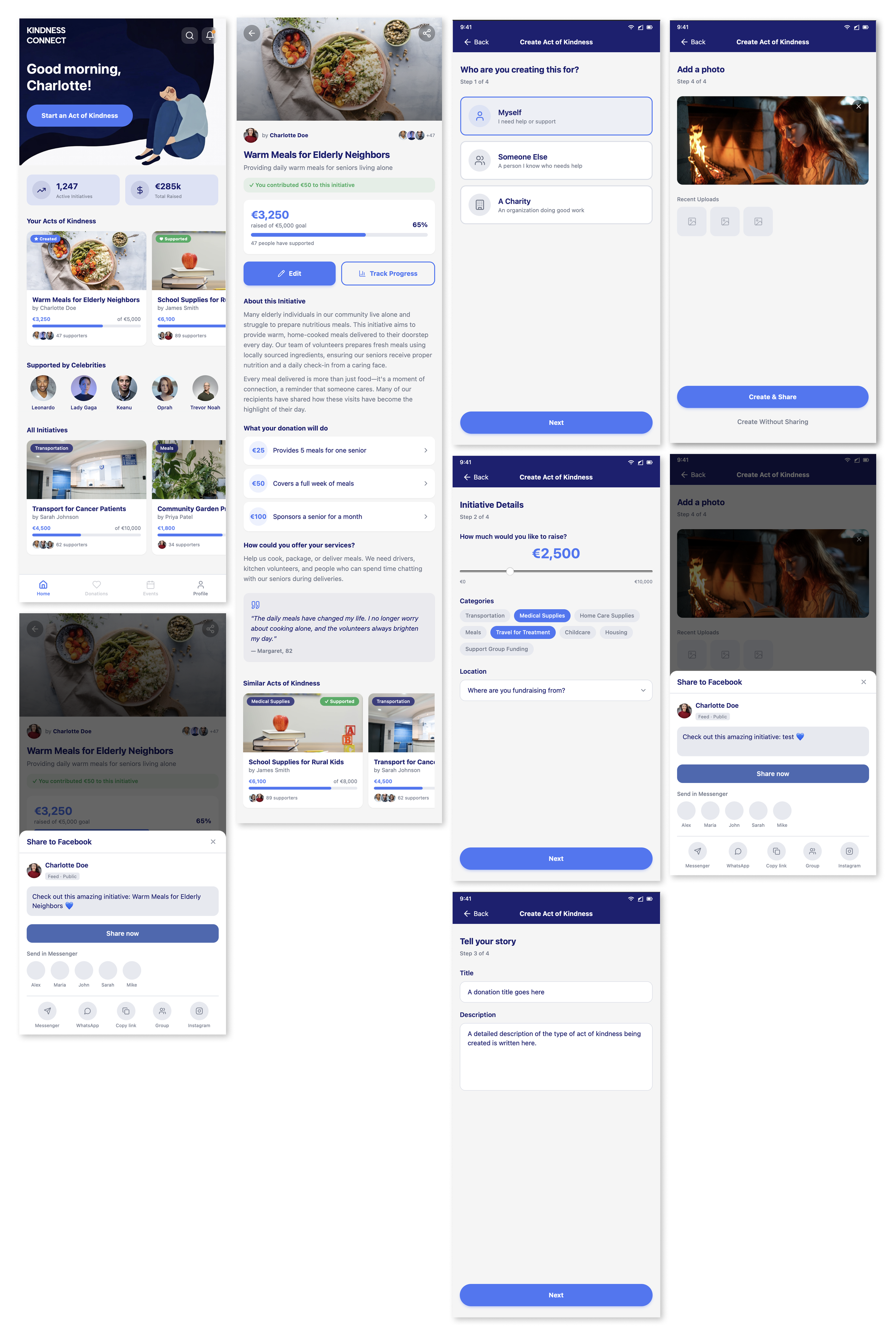
See full interactive prototype here
DESIGN & PROTOTYPE
Concept 4: What to expect gererator
Concept Overview
Description
Caregivers upload medical documents and basic information about the patient’s condition and their own caregiving role. The platform uses AI to simplify medical language, interpret lab results and reports, and generate short, personalised explanations aligned with the patient’s treatment phase. Based on this context, it delivers tailored resources, practical guidance and a “what to expect” journey, while also connecting caregivers with others who have experienced similar situations to reduce uncertainty, stress and isolation.
Problem Statement
Caregivers often luck clear guidance on what to expect in the caregiving journey, leading to uncertainty and stress.
Solution
A tool that provides personalized caregiving journeys based on patient condition and caregiver needs.
Needs
Personalised Caregiving guidance based on treatment phase
Offers tailored guidance aligned with the patient’s current treatment stage.Connection with other caregivers for emotional support
Creates opportunities to connect with caregivers for shared emotional support.Resources and suggestions tailored the caregiver’s role
Provides targeted resources that match the caregiver’s responsibilities.
Pains
Uncertainty about what to expect during treatment
Reduces Uncertainty by outlining what to expect during each treatment phase.Isolation and lack of emotional support
Addresses feelings of isolation by connecting caregiving to supportive communities.Difficulty finding relevant information
Ensures easy access to relevant caregiving recourses for each stage of the journey.
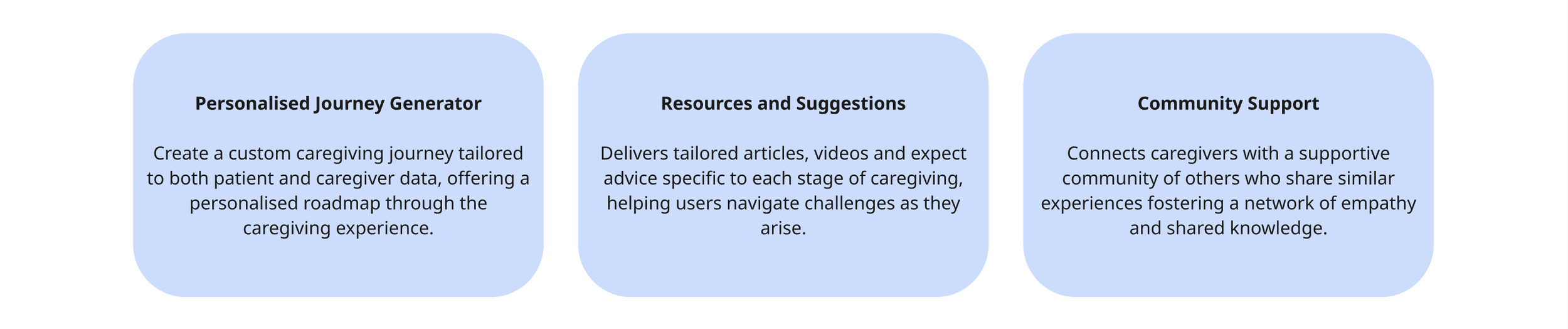
Key Features
Key features focus on AI-powered document upload, medical jargon simplification, lab and report interpretation, multilingual translation and concise, personalised summaries — helping caregivers quickly understand critical information and what to expect at each stage of the caregiving journey.
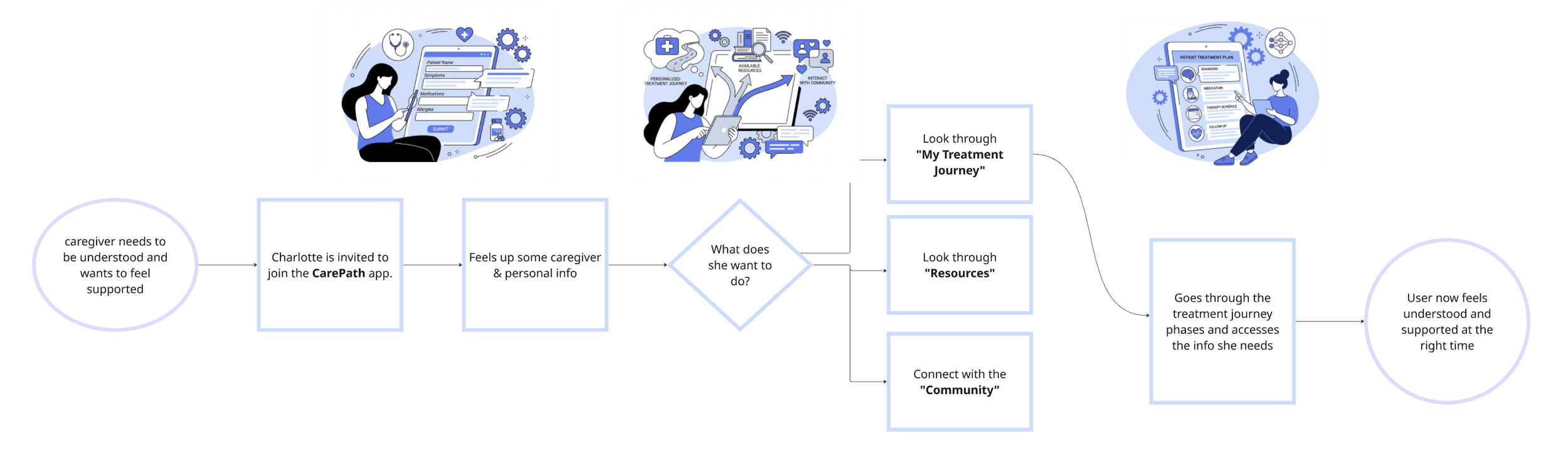
User Flow
User flows focus on guiding caregivers through a simple, step-by-step journey — from uploading medical documents and defining the patient condition and caregiving role, to receiving personalised insights, “what to expect” guidance, relevant resources and peer support — with minimal friction and clear next actions at every stage.
Information Architecture (IA)
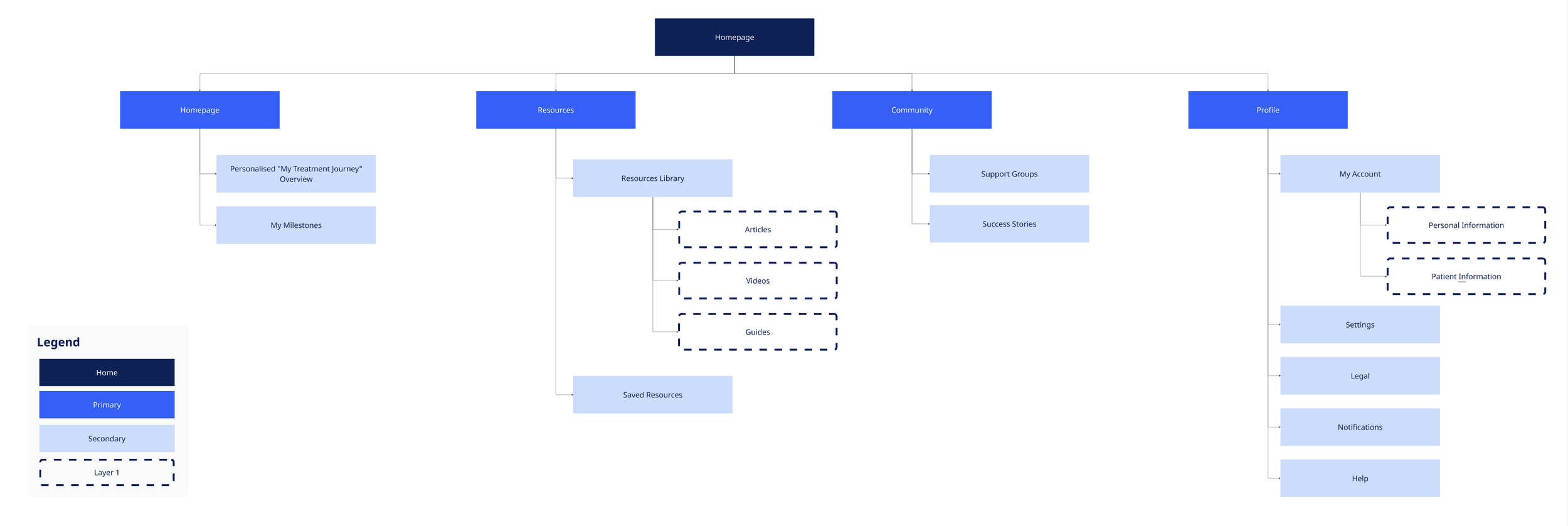
Information architecture focuses on organising the caregiving experience around the patient’s condition, treatment stage and caregiver role. Content, tools and community features are structured by journey phase, enabling caregivers to easily access relevant documents, personalised guidance, resources and peer connections in one clear, intuitive flow.
High Fidelity Wireframes & Interactive Prototype
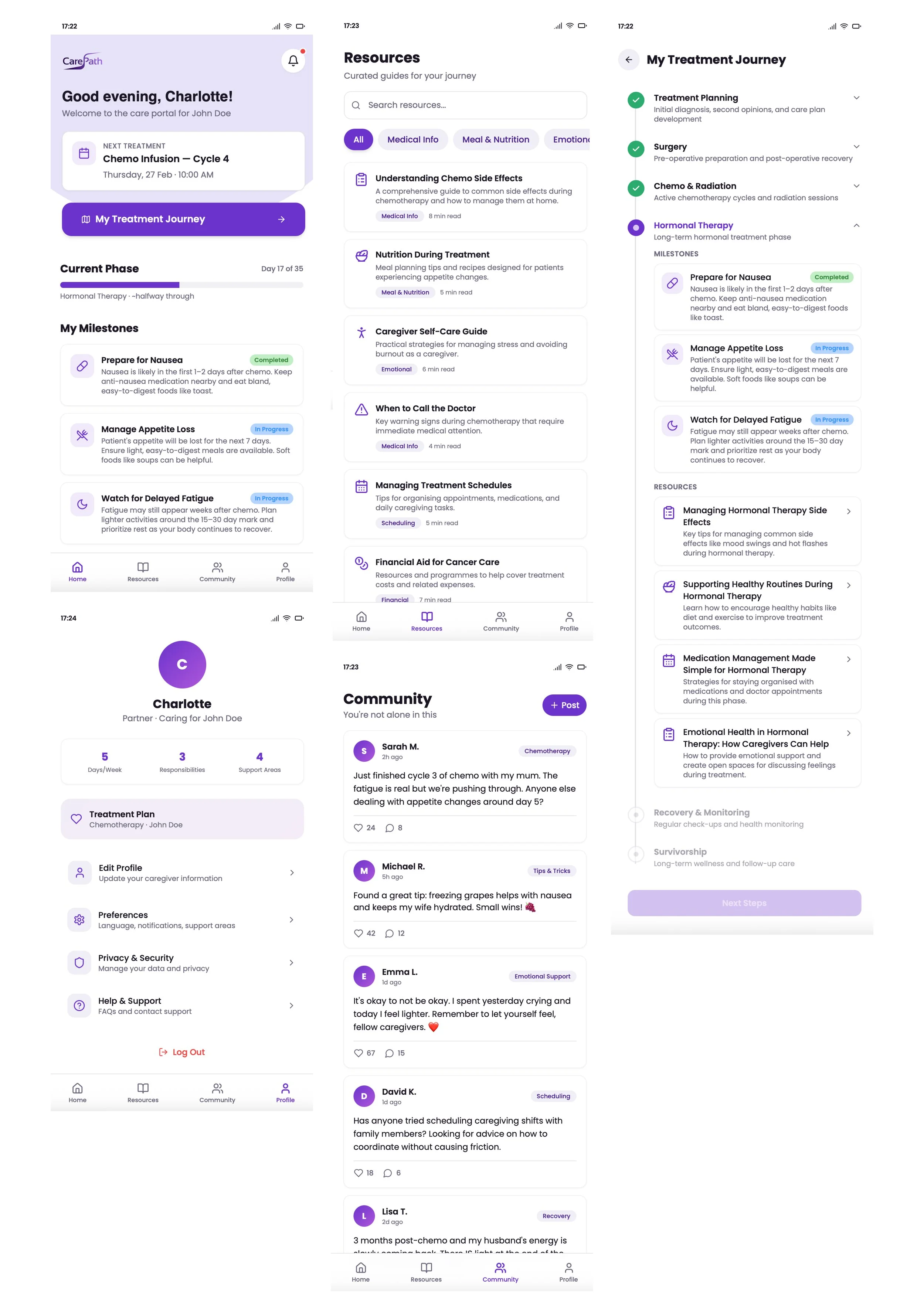
High-fidelity and interactive prototypes focus on visualising the end-to-end caregiving experience with realistic content, personalised scenarios and key AI features — allowing stakeholders to explore document upload, simplified insights, “what to expect” journeys and peer support interactions in a clear, testable flow.
TESTING
Building four test plans
In order to make sure the design decisions I made effectively help reach the goals of each of the 4 use cases. I created a detailed test plan to test the hypothesis of each.
Test Plan Overview
OBJECTIVE
The primary goal is to assess:
Ease of Use
How easily caregivers can navigate and complete key tasks.Relevance
Whether the features effectively address caregiver’s needs.Emotional Impact
How the solutions affect caregivers’ emotional well-being.Engagement
The likelihood of caregivers continuing to use the solutions.
TARGET PARTICIPANTS
Caregiver Profile
Ages 18 - 72 for an oncology patient, residing in the US. Participants should have a mix of tech -savvy and non-tech-savvy users
TESTING METHODOLOGIES
Platform: UserZoom
Test Type: Unmoderated usability testing
Tasks: Predefined tasks for each concept with a mix of common and unique tasks.
Test Plan 1: The Caregiver Portal
Test plan focuses on validating the Caregiver Portal as a central entry point and navigator for caregivers, assessing whether users can easily discover curated services, understand personalised recommendations and successfully find the most relevant resources and support for their specific caregiving needs.
OBJECTIVES
To evaluate the ease of navigation and interaction within the caregiver portal’s marketplace and personalized service selection.
FOCUS AREAS
Navigate to the curate services marketplace.
Selection and exploration or caregiver resources.
Interaction with recommended services and resources.
KPIs
Ease of Navigation through the caregiver marketplace.
Time Spent exploring and selecting services.
Number of errors or points of confusion in the flow.
KEY USER FLOWS
Navigate front he homage to the caregiver section
Browse the marketplace categories.
Select a service and explore details.
Add a service to “favorites” or interact with a “recommendation”
PROTOTYPE TEST
Users test the linked prototype, browsing the marketplace and interacting with services.
Test Plan 2: Medical Sense Maker
Test plan focuses on validating the Medical Sense Maker use case by assessing whether caregivers can successfully upload and understand medical documents through simplified language, accurate lab and report interpretation, reliable translations and clear, concise summaries—ensuring confidence, comprehension and usability across different levels of health literacy.
OBJECTIVES
To evaluate how easily users can access and use the medical data interpretation and simplification tools.
FOCUS AREAS
Simplification of Complex Medical Jargon.
Interpreting and understanding lab data.
Utilising the translation feature for medical reports.
KPIs
Time taken to simplify medical jargon and interpret lab data.
Accuracy and relevance of translations.
User satisfaction with the level of detail in simplification and interpretation.
KEY USER FLOWS
Navigate front he homage to the caregiver section
Browse the marketplace categories.
Select a service and explore details.
Add a service to “favorites” or interact with a “recommendation”
PROTOTYPE TEST
Users test the linked prototype, browsing the marketplace and interacting with services.
Test Plan 3: Acts of Kindness
Test plan focuses on validating the Acts of Kindness platform use case by assessing whether users can easily create and join kindness initiatives, invite others to contribute time or resources, engage with the “Celeb Cameo” feature, connect through Facebook integration and successfully support or fund specific causes—ensuring clarity, engagement and trust across the end-to-end experience.
OBJECTIVES
To access how easily users can navigate the platform, create or contribute to acts of kindness and engage with fundraising or service-based contributions. The community feature will not be tested at this stage.
FOCUS AREAS
Creating or contributing to acts of kindness.
Navigating of fundraising or volunteering contributions.
Interaction with donation and “offer services” features.
KPIs
Ease of contribution to acts of kindness (financial or service-based)
Time taken to complete a donation or volunteer process. (this flow will have to be finalised)
User engagement with the social media and “Celeb Cameo” features. (possibly through A/B Testing)
KEY USER FLOWS
Navigate front the homepage to the view of Acts of Kindness
Select an act to explore details
Choose to either donate or offer services
Share an act via social media or view celebrity particiaption
PROTOTYPE TEST
Users go through the linked prototype, simplifying medical jargon and interpreting a sample lab report.
Test Plan 4: What to Expect Generator
Test plan focuses on validating the personalised caregiving journey use case by assessing whether caregivers can easily upload medical documents and profile information, understand AI-simplified insights and treatment-phase explanations, follow clear “what to expect” journeys, access relevant resources and successfully connect with peer caregivers—ensuring reduced uncertainty, emotional support and confidence throughout the experience.
OBJECTIVES
To assess how well the platform personalizes content and recommendations based on the patient’s treatment phase.
FOCUS AREAS
Account setup and personalized based on caregiving role and patient information.
Exploring resources tailored to the patient’s treatment phase (chemo, radiation, hormonal therapy, etc.)
Interaction with the caregiver community and support network.
KPIs
Time to complete profile setup and receive recommendations.
User satisfaction with the personalized resources.
Interaction with the caregiver support community
KEY USER FLOWS
Setup a caregiver profile with patient treatment details
View personalized recommendations and resources for the current treatment phase.
Engage with the community for emotional support or advice
PROTOTYPE TEST
Users go through the linked prototype, simplifying medical jargon and interpreting a sample lab report.
Other Testing Phases
PRE - TEST SURVEY
Gather background information on participants (caregiving experience, tech proficiency).
Assess their emotional state, caregiving pain points and familiarity with similar digital tools
POST - TEST SURVEY
Ask for feedback on:
Ease of navigation and task completion
Perceived usefulness of the solutions
Emotional Change (e.g. Did the solution reduce stress or anxiety?)
Feature satisfaction (rate features like personalization, medical simplification, community support, etc.)
Likelihood to use or recommend the solution.
Pre- Test Survey Example
CAREGIVING EXPERIENCE:
“How long have you been a caregiver?”
“What type of support do you typically provide (e.g. transportation, medical assistance, emotional support)?”
FAMILIARITY WITH DIGITAL TOOLS:
“Have you used any digital caregiving tools before? If yes, which ones?”
EMOTIONAL STATE (1 - 5 SCALE):
How stressed or anxious do you feel on an average day?”
EXPECTATIONS:
“What do you hope a caregiving tool could help you with (e.g. finding resources, simplifying medical information, getting community support)?”
PRE-TEST BRIEFING:
Provide clear, simple instructions on what users will be testing.
Ensure users understand that their feedback will help improve tools for caregivers.
Post- Test Survey Example (length 1-5 minutes)
EASE OF USE:
“How easy was it to navigate and complete tasks?”
USEFULNESS:
“How useful did you find the tool in addressing your caregiving needs?”
EMOTIONAL IMPACT:
“Did this tool reduce your caregiving stress or anxiety? (yes/no)”
FEEDBACK ON KEY FEATURES:
“Which features did you find most valuable?”
“Is these anything you found frustrating or difficult?”
LIKELIHOOD OF FUTURE USE (1-5 SCALE):
“Would you use this tool in the future?”
“Would you recommend it to other caregivers?”
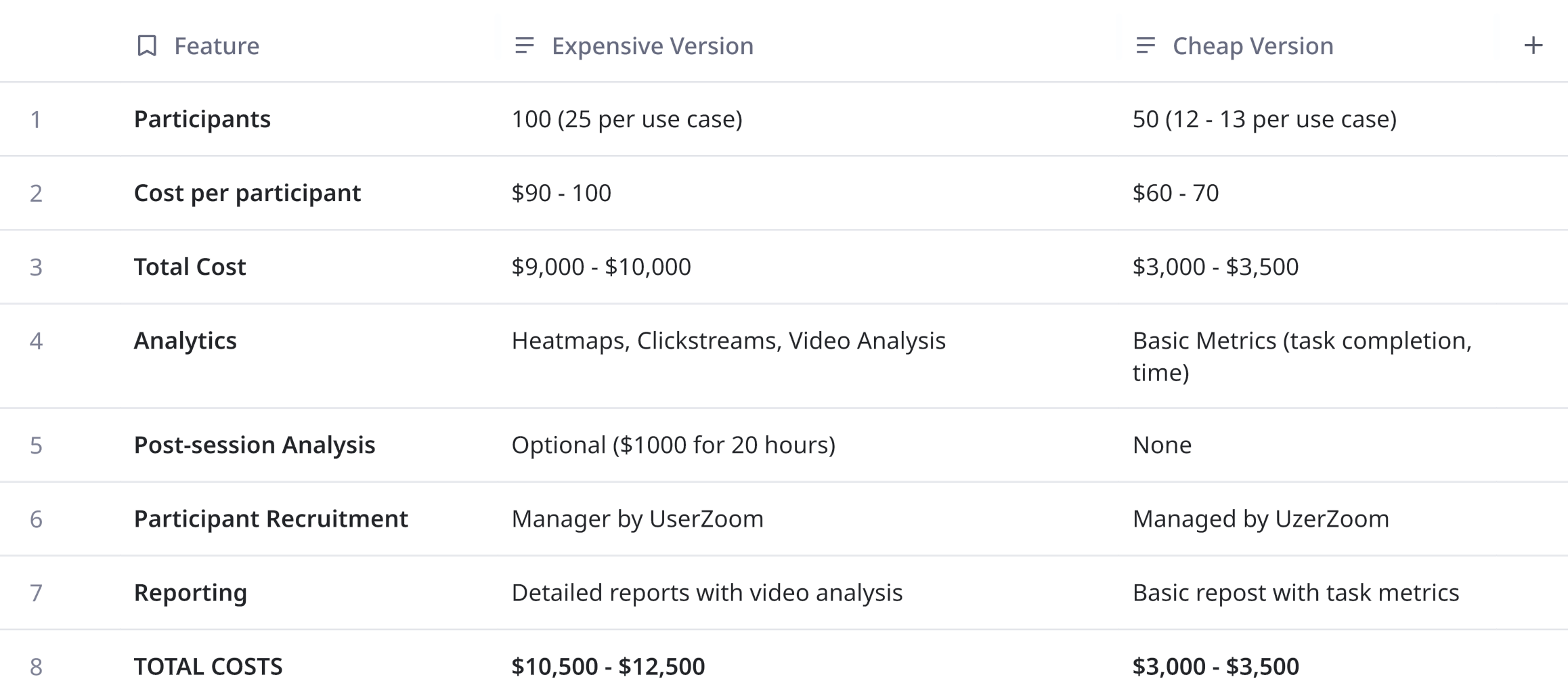
UzerZoom Costing

Conclusion & Next Steps
Each concept addresses key pain points experiences by caregivers, such as emotional support, medical navigation and resource coordination.
Together these concepts form a comprehensive and cohesive caregiving ecosystem that simplifies the caregiving journey.
Next Steps
1. Finalize designs for each use case.
2. Validate concepts through user testing either key metrics.
3. Map stakeholders for each use case
4. Explore partnerships within the organisation to enhance and scale solutions.
5. Prepare for the development phase.